You are here
Facebook now lets you post in the future and manage your admins
Since the release of Facebook Timeline it seems as though we’re getting new features to Facebook every day, all being released without a song or a dance and so they’re easy to miss. But recently some fab new features have been released that we think are worth singing and dancing about as they could be very useful, especially for our business clients.
Schedule Your Posts
What does it mean?
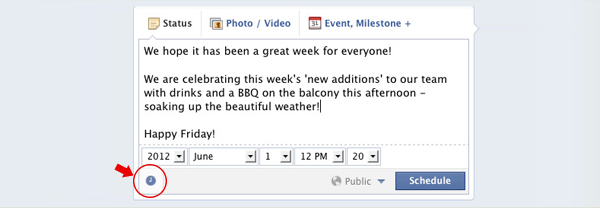
You now have the ability to write a post and schedule it for a time and date up to 6 months in the future, in 15 minute intervals. Do this by writing your post as usual, and clicking the clock icon below and setting a date and time that you would like it to appear. SEE OUR VIDEO DEMO HERE
Below: How to schedule your posts
How does this benefit my business?
- Frees up time at events Usually the best time to update your status is when something exciting is happening. For example, if you’re at a conference it would be nice to keep reminding people that you’re there. However more often than not, you’re far too busy at the actual event to keep disappearing to update your status. This allows you have a backup set of statuses working in the background on your behalf.
- Saves time during the day If you’re rushed off your feet at work for parts of the day, and quiet at other times, this features allows you to make better use of your time and plan a set of status updates in your free time, that get delivered at the times when they'll be most relevant to your audience.
- Allows you to plan posts properly Part of your marketing strategy probably includes a plan to make every status udpate important and well thought out, however when you’re rushing standards can drop. With this feature you have more time to plan a Social Media Campaign with related posts in perfect order with the perfect amount of build up, leaving you to just focus on replies and managing your followers' comments.
Give Different Permissions To Your Page Admins
What does it mean?
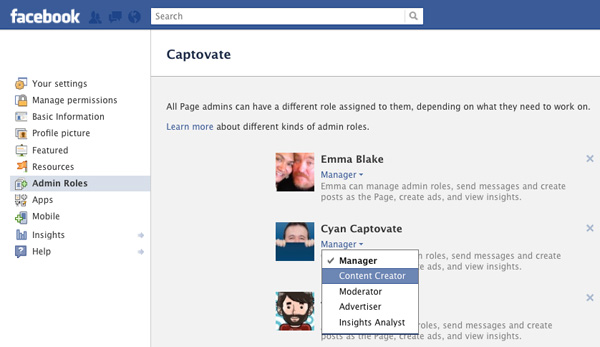
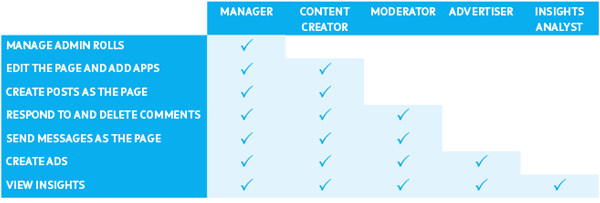
Until now, anyone who had the ability to edit your business Facebook page all had the same permission settings, so they could all add and delete other admins, they could all make changes to pages, and all had access to set up ad campaigns. You can now change that and limit what each person can do individually using the new role settingsm which include manager, content creator, moderator, advertiser and insights analyst.
Below: The new facebook role permissions
How does this benefit my business?
- Protect your page This allows the owner of the company to be the only person to add or delete others, preventing rogue employees deleting everyone else’s account and posting inappropriate content as the company.
- Helps to define people’s roles When a person only has access to the sections they need to have access to, it prevents them from being distracted with other features, or crossing over roles, for example, posting on the company’s behalf when they actually just need to analyse the data.
Below: Changing your admin roles