You are here
It's about Timeline!
And we’re off! We’ve been eagerly awaiting last night’s announcement of Facebook Timeline for brands, and finally it’s brought us everything that we hoped for and expected, including the new and improved interface, insights and customisation.
The Timeline pages are available from today so you can get started straight away. If you want to take your time and get your pages as good as they can be before releasing, you have until the 30th March before you’ll be forced to take the new design. For your business and brand, this change is huge, and completely changes how people will interact with your page, so the sooner you take advantage, the better.
Now that we have a better understanding of the Timeline for brands, here’s our top list of things to know and do.
How do we get it?
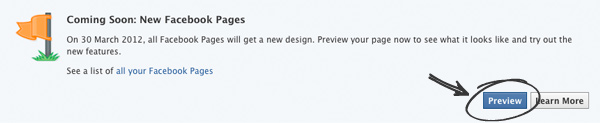
When you log in to your page, you’ll see a prompt in the top right corner telling you about the changes, and that you can review your new design now. Click this to be taken to a page where you can start putting together your new timeline. None of this will be shown to the public until you click publish in the top right, so you have plenty of time to get it perfect before going live.
Looking good - the new profile picture and banner area
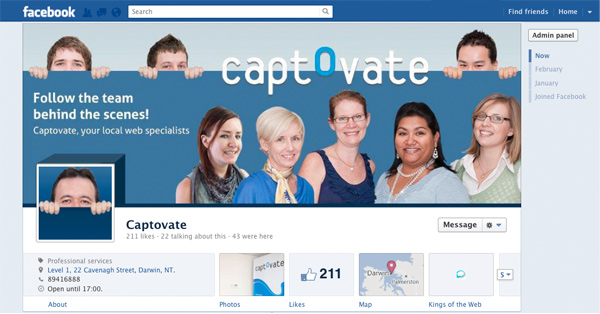
This is perhaps the most exciting part for your design team, it was for us! Before, the only image that was always visible was the left hand side profile picture. The rest of the design, for example your ‘like us’ graphic page, was hard coded into the page and was only seen when people arrived at your page for the first time. Now we have two sections to play with.
- A profile picture that also acts as your icon for posts
This is a smaller square image that is referred to as your profile picture. This image will need to be 180 x 180 pixels and also acts as the icon for your updates and comments so a good idea is to use a logo or graphic that still is recognisable as your brand when it is shrunk to 50 x 50 pixels. - A large banner graphic area
This is great news for businesses. It's a huge area that allows for a large graphic of your choice to permanently display at the top of your timeline. This could be a product that you sell, it could be an image of your offices, or your team. Basically anything that shows off your company that you didn’t have enough room for before!However, there is a grey area that we’ve come across. The first time you upload an image you will see a warning that says: “This space is not meant for banner ads or other promotions. Please don’t use content that is commercial, promotional, copyright-infringing or already in use on other people’s covers”. Now anything related to your brand could be argued as being promotional and it’s a banner area, so anything could technically referred to as a banner ad too. Time will tell how strict they’re going to be with this. Our prediction is that it is there more for copyright issues, and day to day promotions are going to be fine. We’ll keep you updated with this issue.
QUICK TIP: Facebook will automatically reduce the size and quality of your banner image if it is above 50kb in size. To try avoid this, make sure your image is 851 x 315px and optimised for the web. Otherwise your beautiful picture will turn out blurry!
You can still ‘Like’ us

There was quite a bit of speculation as to whether the new pages would still feature a ‘like’ button, and.. they do! It’s tucked away underneath your banner image, and the number of people who like your page have been brought out as a possible feature box (you can choose to hide it) in the same section as the other feature boxes such as photos.
If you currently have an image dedicated to directing people to the like us button, the good news is that you don’t have to change strategy completely and start from scratch. The button is still very close to the banner, so the designs we’ve become accustomed to with arrows pointing towards your like button can still be used, you’d just need to get your designer to change proportions and layout of your graphics.
What’s happening to the existing apps?

The apps that we’re talking about are ones that you may have already had built. Some of you have been to us and got us to create you a welcome page, a news feed or email sign up form, and these are currently featured in a panel down the left hand side as tabs.
The apps are still going to be there, and the apps you’ve had built will still exist, but will be more visible. Links to the apps appear as boxes just underneath the banner, and you can choose which ones are visible to users. The rest will be hidden until the user clicks the dropdown button to reveal the complete list. For this reason you need to consider which apps are of most importance from a marketing perspective to your business.
When users click on the app they will now be taken to a new page that is purely dedicated to that app. This is great news and will allow for the creative a mini sites and functions that will look and feel much more important on their own page. Of course the ones you already have may need rethinking, for example as the like pages will no longer make sense and will need to be added to the banner on the home page rather than being an app; and the welcome pages will need renaming, as we can no longer set them as the first thing you see. Timeline does not allow a default landing page.
Prioritise and show off your content with more control
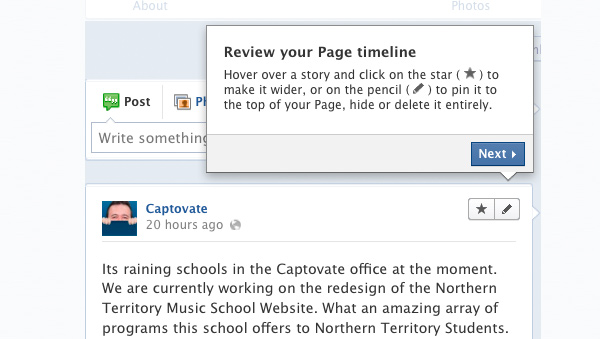
For those of you who came to our talk earlier in the week we showed you the options that you have for organising and highlighting your content. And thankfully this is one of the features Facebook has kept.
This is fantastic news for marketers. Previously everything happened in chronological order regardless of importance. So if you had something you wanted to show off, you need to keep mentioning it, or stop mentioning anything else to keep that as the first thing people saw. Now you have two new options to help prioritise your feeds.
The first one is the highlight feature. If you hover your mouse over any feed, the star icon appears in the top right. If you click this, the post will expand to the width of the entire page. This gives it a much higher visual importance, especially when you have photo albums or banners.
The second option is the pin feature (nothing to do with Pinterest). With this you're able to pin one item at a time, and have that stick to the top of your timeline. This allows you to always have your most important story as a feature with normal day to day updates appearing below it.
Look backwards
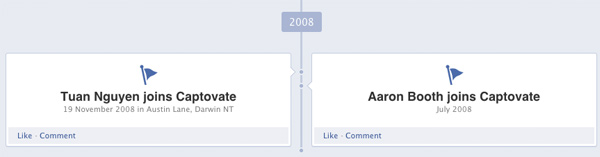
Not usual advice for a forward thinking design agency! Facebook Timeline now allows brands to fill out their company history in a more exciting way than the previous About page. You can now add important milestones to your company profile, and these appear in your timeline retrospectively by selecting ‘milestone’ just above the status box.
You could add when the company was formed, when key team members joined, when you won awards etc and have them feature as highlights that people search through.
This gives your company the chance to sell itself on its whole history and not just the last ten things posted on the page. You will see in the top right of the timeline the option to go back to when a company was created. So it won’t be long until business owners and potential customers will use this feature to get an insight into a company's professional history and not just its social activity. So make sure you take advantage of this!
Integrated Timeline Apps
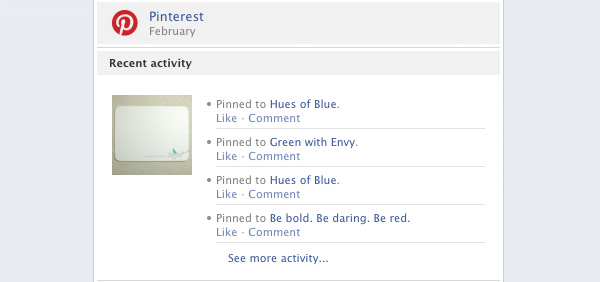
Facebook has the facility to integrate 60 of the world’s most common/popular websites as apps to your timeline. These are different from the ones previously mentioned, but currently have the same name. So for the purpose of making this blog easier to understand, we’ll refer to the new ones as Integrated Timeline Apps!
These apps are from third parties such as Pinterest, eBay and Trip Advisor. They all work slightly differently, but the key principles are the same. When you sign up to the third party website there will be an option to attach the account to your Facebook Page. Whenever you interact with the third party site, Facebook will pull in those interactions and summarise them in a little block on your timeline. This is a very subtle but effective way of telling your customers you’re active in your field of expertise. It isn’t blatently self promotional, rather it provides a clear and concise overview of your social interactions.
This is great for marketers for a few different reasons. Let's take the Pinterest App, for example;
- When users see the Pinterest box in the Facebook Timeline it will show how many images you’ve added to your Pinterest Boards this month cumulatively. To do this previously, you would have had many single manual updates on your page and these would remain, interrupting your other statuses. Individually, these things probably aren’t worth shouting about, but when you’ve added a bunch it’s great to see that.
- It means less effort when it comes to showing how active you are on the web, because it no longer needs you to share the actions yourself on top of whatever you’re doing on the third party site, so it’s a great time saver.
These points are the ones that we think will help you get started, and hopefully you’ll find them useful. We will be adding to this as more features are released, and we’ll also be showing you the new reporting and insights sections soon.
But the best way to learn is to have a play around with the new Timeline and get used to the new features and we're always here if you need a hand.
For anyone who would like to discuss what can be done with their new Facebook Timeline, we’re offering a free consultation with our Social Media Team to discuss what Captovate can do for you. Simply contact us on info@captovate.com.au to arrange a meeting.